🚀 Windows Setup Launcher v2.0 업데이트 리포트
이번 업데이트의 핵심은 **"스마트한 자동화와 레거시 환경의 완벽한 분리"**입니다. 윈도우 11 설치의 가장 큰 벽인 MS 계정 강제 로그인을 우회하면서도, 이전 OS와의 호환성을 놓치지 않았습니다.
Setup.exe /unattend:X:\unattend.xml
https://noways.tistory.com/2300
Windows Setup Launcher v3.0 - 오류 수정
Windows 11 24H2 이후 버전의 설치 방식 변경에 따른 오류 원인과 이를 해결하기 위한 함수 개선 1. 오류 발생 원인 분석Windows 11 24H2(및 그 이후 빌드)부터는 기존의 단일 setup.exe 방식에서 설치 구조가
noways.tistory.com
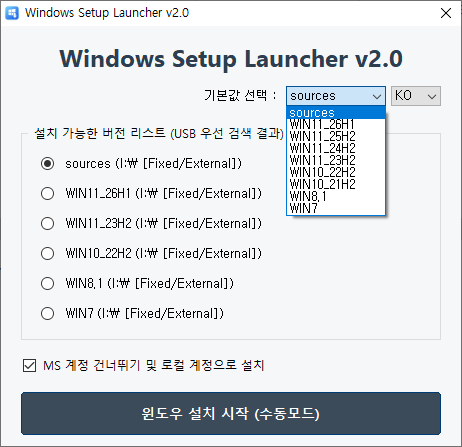
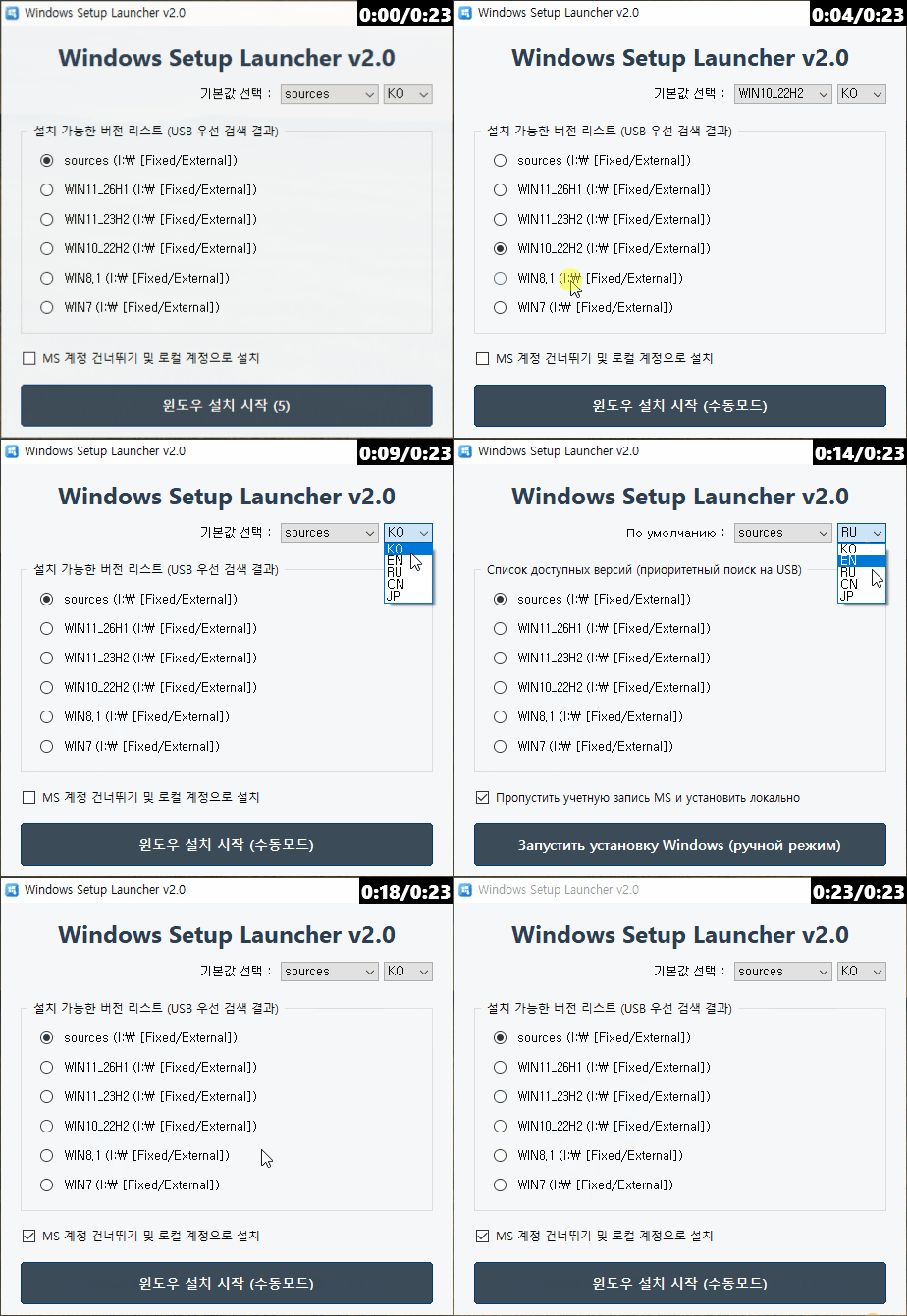
1. 스마트 /unattend 옵션 제어 (자동 비활성화)
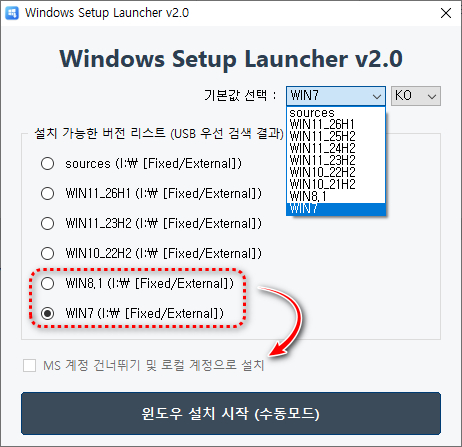
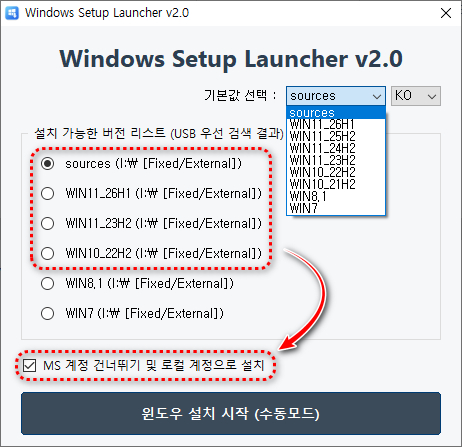
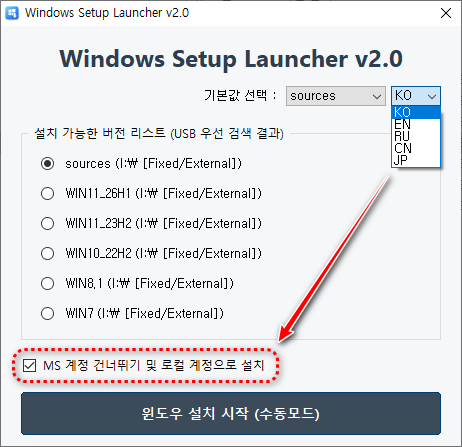
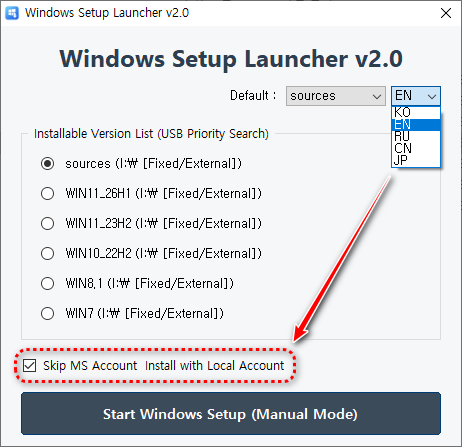
모든 윈도우 버전에 동일한 옵션을 적용하던 방식에서 벗어나, 선택된 OS에 따라 UI가 동적으로 반응합니다.
- 대상: Windows 7, Windows 8.1
- 변경점: 해당 버전 선택 시 'MS 계정 건너뛰기' 체크박스가 자동으로 해제되며 비활성화(Gray-out) 처리됩니다.
- 효과: 레거시 OS에서 불필요한 옵션 적용으로 인한 설치 오류를 원천 차단합니다.
2. 하이브리드 unattend.xml 경로 로직
설치 파일(unattend.xml)을 찾는 방식이 더욱 견고해졌습니다. 유연성을 극대화하기 위해 2단계 우선순위를 적용합니다.
- 1순위 (사용자 정의): USB 드라이브 루트에 있는 파일을 우선 탐색합니다. (사용자 커스텀 가능)
- 2순위 (시스템 내장): USB에 파일이 없을 경우, 프로그램에 내장된 파일을 시스템 임시 경로(\Windows\Temp)에 즉시 해제하여 사용합니다.
    <settings pass="oobeSystem">
        <component name="Microsoft-Windows-International-Core" processorArchitecture="amd64" publicKeyToken="31bf3856ad364e35" language="neutral" versionScope="nonSxS" xmlns:wcm="http://schemas.microsoft.com/WMIConfig/2002/State" xmlns:xsi="http://www.w3.org/2001/XMLSchema-instance">
            <!-- 키보드 레이아웃과 같은 입력 디바이스에 대한 입력 언어 및 메서드를 지정합니다. -->
            <!-- Specify input languages and methods for input devices such as the keyboard layout -->
            <InputLocale>0412: {A028AE76-01B1-46C2-99C4-ACD9858AE02F} {B5FE1F02-D5F2-4445-9C03-C568F23C99A1}</InputLocale>
            <!-- Windows 설치의 날짜, 시간, 통화 및 숫자 서식 지정에 사용되는 사용자별 설정을 지정합니다. -->
            <!-- Specify user-specific settings used for date, time, currency, and number formatting in Windows installation -->
            <UserLocale>ko-KR</UserLocale>
            <!-- 메뉴, 대화 상자 및 도움말 파일과 같은 UI(사용자 인터페이스) 항목을 표시하기 위해 사용되는 기본 시스템 언어를 지정합니다. -->
            <!-- Specify the default system language used to display UI elements such as menus, dialogs, and help files -->
            <UILanguage>ko-KR</UILanguage>
            <!-- 유니코드가 아닌 프로그램에 사용할 기본 언어를 지정합니다. -->
            <!-- Specify the default language for non-Unicode programs -->
            <SystemLocale>ko-KR</SystemLocale>
        </component>
언어 및 키보드 레이아웃 설정까지 포함할 경우, 이후 계정 생성 단계까지 자동으로 진행됩니다. 다만, 런처에 내장된 unattend.xml 파일은 다국어 공용 환경을 고려하여 해당 설정이 기본적으로 제외되어 있습니다.

[ 한국어 전용 - unattend.xml ]
<?xml version="1.0" encoding="utf-8"?>
<unattend xmlns="urn:schemas-microsoft-com:unattend">
    <servicing></servicing>
    <settings pass="windowsPE">
        <component name="Microsoft-Windows-Setup" processorArchitecture="amd64" publicKeyToken="31bf3856ad364e35" language="neutral" versionScope="nonSxS" xmlns:wcm="http://schemas.microsoft.com/WMIConfig/2002/State" xmlns:xsi="http://www.w3.org/2001/XMLSchema-instance">
            <RunSynchronous>
            </RunSynchronous>
            <!-- 사용자 설정을 지정합니다. -->
            <UserData>
                <ProductKey>
                <!-- 빈칸은 제품 키 없이 통과함 -->
                <Key></Key>
                </ProductKey>
                <!-- Microsoft 소프트웨어 사용 조건에 자동으로 동의할지 여부를 지정합니다. -->
                <AcceptEula>true</AcceptEula>
            </UserData>
            <!-- Windows PE(Windows 사전 설치 환경)에 대해 Windows 방화벽을 사용할 수 있는지 여부를 지정합니다. 이 설정은 Windows 설치의 Windows 방화벽 설정에는 적용되지 않습니다. -->
            <EnableFirewall>true</EnableFirewall>
            <!-- 네트워크 연결을 사용할지 여부를 지정합니다. 이 설정은 Windows PE(Windows 사전 설치 환경)에만 적용됩니다. -->
            <EnableNetwork>false</EnableNetwork>
        </component>
    </settings>
    <settings pass="offlineServicing">
        <component name="Microsoft-Windows-WiFiNetworkManager" processorArchitecture="amd64" publicKeyToken="31bf3856ad364e35" language="neutral" versionScope="nonSxS" xmlns:wcm="http://schemas.microsoft.com/WMIConfig/2002/State" xmlns:xsi="http://www.w3.org/2001/XMLSchema-instance">
            <!-- 사용하도록 설정된 경우 자동으로 공개 네트워크에 연결하는 Wi-Fi 센스 OOBE 확인란이 선택됩니다. -->
            <DefaultAutoConnectOpenState>0</DefaultAutoConnectOpenState>
            <!-- 디바이스 OOBE 중에 연락처와 Wi-Fi 네트워크 액세스를 교환할 수 있도록 허용에 대한 확인란의 선택을 취소합니다. -->
            <DefaultAutoConnectSharedState>0</DefaultAutoConnectSharedState>
            <!-- Wi-Fi 센스를 사용하거나 사용하지 않습니다. Wi-Fi 센스 기능에는 Wi-Fi 핫스팟 및 자격 증명 공유에 대한 자동 연결이 포함됩니다. -->
            <WiFiSenseAllowed>0</WiFiSenseAllowed>
        </component>
        <component name="Security-Malware-Windows-Defender" processorArchitecture="amd64" publicKeyToken="31bf3856ad364e35" language="neutral" versionScope="nonSxS" xmlns:wcm="http://schemas.microsoft.com/WMIConfig/2002/State" xmlns:xsi="http://www.w3.org/2001/XMLSchema-instance">
            <!-- Microsoft Defender를 권장 기본 설정을 사용하여 원격으로 관리할 수 있도록 구성할지 여부를 지정합니다. -->
            <EnableRemoteManagedDefaults>false</EnableRemoteManagedDefaults>
        </component>
        <component name="Microsoft-Windows-Embedded-KeyboardFilterService" processorArchitecture="amd64" publicKeyToken="31bf3856ad364e35" language="neutral" versionScope="NonSxS" xmlns:wcm="http://schemas.microsoft.com/WMIConfig/2002/State" xmlns:xsi="http://www.w3.org/2001/XMLSchema-instance">
            <!-- 브라우저 전달 키가 차단되지 않습니다. 이것은 기본값입니다. -->
            <BrowserForward>Allowed</BrowserForward>
            <!-- Microsoft Defender를 권장 기본 설정을 사용하여 원격으로 관리할 수 있도록 구성할지 여부를 지정합니다. -->
            <ForceOffAccessibility>true</ForceOffAccessibility>
        </component>
    </settings>
    <settings pass="generalize">
        <component name="Microsoft-Windows-WwanUI" processorArchitecture="amd64" publicKeyToken="31bf3856ad364e35" language="neutral" versionScope="nonSxS" xmlns:wcm="http://schemas.microsoft.com/WMIConfig/2002/State" xmlns:xsi="http://www.w3.org/2001/XMLSchema-instance">
            <!-- OOBE에서 모바일 광대역 디바이스 또는 네트워크를 숨깁니다. -->
            <NotInOOBE>true</NotInOOBE>
        </component>
        <component name="Microsoft-Windows-TapiSetup" processorArchitecture="amd64" publicKeyToken="31bf3856ad364e35" language="neutral" versionScope="nonSxS" xmlns:wcm="http://schemas.microsoft.com/WMIConfig/2002/State" xmlns:xsi="http://www.w3.org/2001/XMLSchema-instance">
            <!-- 구성된 전화 통신 위치를 다시 작성하도록 지정합니다. -->
            <TapiConfigured>0</TapiConfigured>
        </component>
    </settings>
    <settings pass="specialize">
        <component name="Microsoft-Windows-Deployment" processorArchitecture="amd64" publicKeyToken="31bf3856ad364e35" language="neutral" versionScope="nonSxS" xmlns:wcm="http://schemas.microsoft.com/WMIConfig/2002/State" xmlns:xsi="http://www.w3.org/2001/XMLSchema-instance">
            <RunSynchronous>
                <!-- 윈도우11 네트워크 인터넷 연결 없이 설치하기(OOBE\BYPASSNRO, 윈도우11에만 적용) -->
                <!-- Install Windows 11 without Internet connection (OOBE\BYPASSNRO, applies to Windows 11 only) -->
                <RunSynchronousCommand wcm:action="add">
                    <Order>1</Order>
                    <Path>cmd /c for /f "tokens=3 delims=.]" %a in ('ver') do if %a geq 21996 (reg add "HKLM\SOFTWARE\Microsoft\Windows\CurrentVersion\OOBE" /v BypassNRO /t REG_DWORD /d 1 /f)</Path>
                </RunSynchronousCommand>
                <!-- Temporarily disable all network adapters to prevent updates during Windows OOBE -->
                <RunSynchronousCommand wcm:action="add">
                    <Order>2</Order>
                    <Path>powershell.exe -NoProfile -WindowStyle Hidden -ExecutionPolicy Bypass -Command "Get-NetAdapter | Disable-NetAdapter -Confirm:$false"</Path>
                </RunSynchronousCommand>
            </RunSynchronous>
        </component>
        <component name="Microsoft-Windows-Printing-Spooler-Core" processorArchitecture="amd64" publicKeyToken="31bf3856ad364e35" language="neutral" versionScope="nonSxS" xmlns:wcm="http://schemas.microsoft.com/WMIConfig/2002/State" xmlns:xsi="http://www.w3.org/2001/XMLSchema-instance">
            <!-- 시스템이 부팅될 때 스풀러 자동 로그가 기본적으로 시작되지 않습니다. -->
            <Start>0</Start>
        </component>
        <component name="Microsoft-Windows-ErrorReportingCore" processorArchitecture="amd64" publicKeyToken="31bf3856ad364e35" language="neutral" versionScope="nonSxS" xmlns:wcm="http://schemas.microsoft.com/WMIConfig/2002/State" xmlns:xsi="http://www.w3.org/2001/XMLSchema-instance">
            <!-- Windows 오류 보고 기능을 비활성화합니다. -->
            <DisableWER>1</DisableWER>
        </component>
        <component name="Microsoft-Windows-Security-SPP-UX" processorArchitecture="amd64" publicKeyToken="31bf3856ad364e35" language="neutral" versionScope="nonSxS" xmlns:wcm="http://schemas.microsoft.com/WMIConfig/2002/State" xmlns:xsi="http://www.w3.org/2001/XMLSchema-instance">
            <!-- Windows에서 자동으로 정품 인증을 시도하지 않도록 지정합니다. -->
            <SkipAutoActivation>true</SkipAutoActivation>
        </component>
        <component name="Microsoft-Windows-SQMApi" processorArchitecture="amd64" publicKeyToken="31bf3856ad364e35" language="neutral" versionScope="nonSxS" xmlns:wcm="http://schemas.microsoft.com/WMIConfig/2002/State" xmlns:xsi="http://www.w3.org/2001/XMLSchema-instance">
            <!-- OOBE 중에 Windows CEIP가 선택되도록 지정합니다. 사용자가 설치하는 동안 OOBE를 건너뛰기로 결정하면 CEIP가 옵트아웃됩니다. 사용자는 더 이상 알림을 받지 못합니다. -->
            <CEIPEnabled>0</CEIPEnabled>
        </component>
        <component name="Microsoft-Windows-TCPIP" processorArchitecture="amd64" publicKeyToken="31bf3856ad364e35" language="neutral" versionScope="nonSxS" xmlns:wcm="http://schemas.microsoft.com/WMIConfig/2002/State" xmlns:xsi="http://www.w3.org/2001/XMLSchema-instance">
            <!-- IPv4 및 IPv6 경로 캐시가 ICMP 리디렉션 메시지에 대한 응답으로 업데이트되지 않도록 지정합니다. -->
            <IcmpRedirectsEnabled>false</IcmpRedirectsEnabled>
        </component>
    </settings>
    <settings pass="oobeSystem">
        <component name="Microsoft-Windows-International-Core" processorArchitecture="amd64" publicKeyToken="31bf3856ad364e35" language="neutral" versionScope="nonSxS" xmlns:wcm="http://schemas.microsoft.com/WMIConfig/2002/State" xmlns:xsi="http://www.w3.org/2001/XMLSchema-instance">
            <!-- 키보드 레이아웃과 같은 입력 디바이스에 대한 입력 언어 및 메서드를 지정합니다. -->
            <!-- Specify input languages and methods for input devices such as the keyboard layout -->
            <InputLocale>0412: {A028AE76-01B1-46C2-99C4-ACD9858AE02F} {B5FE1F02-D5F2-4445-9C03-C568F23C99A1}</InputLocale>
            <!-- Windows 설치의 날짜, 시간, 통화 및 숫자 서식 지정에 사용되는 사용자별 설정을 지정합니다. -->
            <!-- Specify user-specific settings used for date, time, currency, and number formatting in Windows installation -->
            <UserLocale>ko-KR</UserLocale>
            <!-- 메뉴, 대화 상자 및 도움말 파일과 같은 UI(사용자 인터페이스) 항목을 표시하기 위해 사용되는 기본 시스템 언어를 지정합니다. -->
            <!-- Specify the default system language used to display UI elements such as menus, dialogs, and help files -->
            <UILanguage>ko-KR</UILanguage>
            <!-- 유니코드가 아닌 프로그램에 사용할 기본 언어를 지정합니다. -->
            <!-- Specify the default language for non-Unicode programs -->
            <SystemLocale>ko-KR</SystemLocale>
        </component>
        <component name="Microsoft-Windows-Shell-Setup" processorArchitecture="amd64" publicKeyToken="31bf3856ad364e35" language="neutral" versionScope="nonSxS" xmlns:wcm="http://schemas.microsoft.com/WMIConfig/2002/State" xmlns:xsi="http://www.w3.org/2001/XMLSchema-instance">
            <OOBE>
                <HideEULAPage>true</HideEULAPage>
                <HideLocalAccountScreen>true</HideLocalAccountScreen>
                <HideOEMRegistrationScreen>true</HideOEMRegistrationScreen>
                <HideOnlineAccountScreens>true</HideOnlineAccountScreens>
                <HideWirelessSetupInOOBE>true</HideWirelessSetupInOOBE>
                <ProtectYourPC>3</ProtectYourPC>
                <SkipUserOOBE>true</SkipUserOOBE>
                <UnattendEnableRetailDemo>false</UnattendEnableRetailDemo>
            </OOBE>
            <FirstLogonCommands>
                <!-- OOBE 완료 후 네트워크 어댑터를 활성화합니다. -->
                <!-- Enable network adapters after OOBE completion -->
                <SynchronousCommand wcm:action="add">
                    <Order>1</Order>
                    <CommandLine>powershell.exe -NoProfile -WindowStyle Hidden -ExecutionPolicy Bypass -Command "Get-NetAdapter | Enable-NetAdapter -Confirm:$false"</CommandLine>
                </SynchronousCommand>
            </FirstLogonCommands>
        </component>
        <component name="Microsoft-Windows-Sidebar" processorArchitecture="amd64" publicKeyToken="31bf3856ad364e35" language="neutral" versionScope="nonSxS" xmlns:wcm="http://schemas.microsoft.com/WMIConfig/2002/State" xmlns:xsi="http://www.w3.org/2001/XMLSchema-instance">
            <SidebarVisible>false</SidebarVisible>
            <SidebarOnByDefault>false</SidebarOnByDefault>
        </component>
    </settings>
</unattend>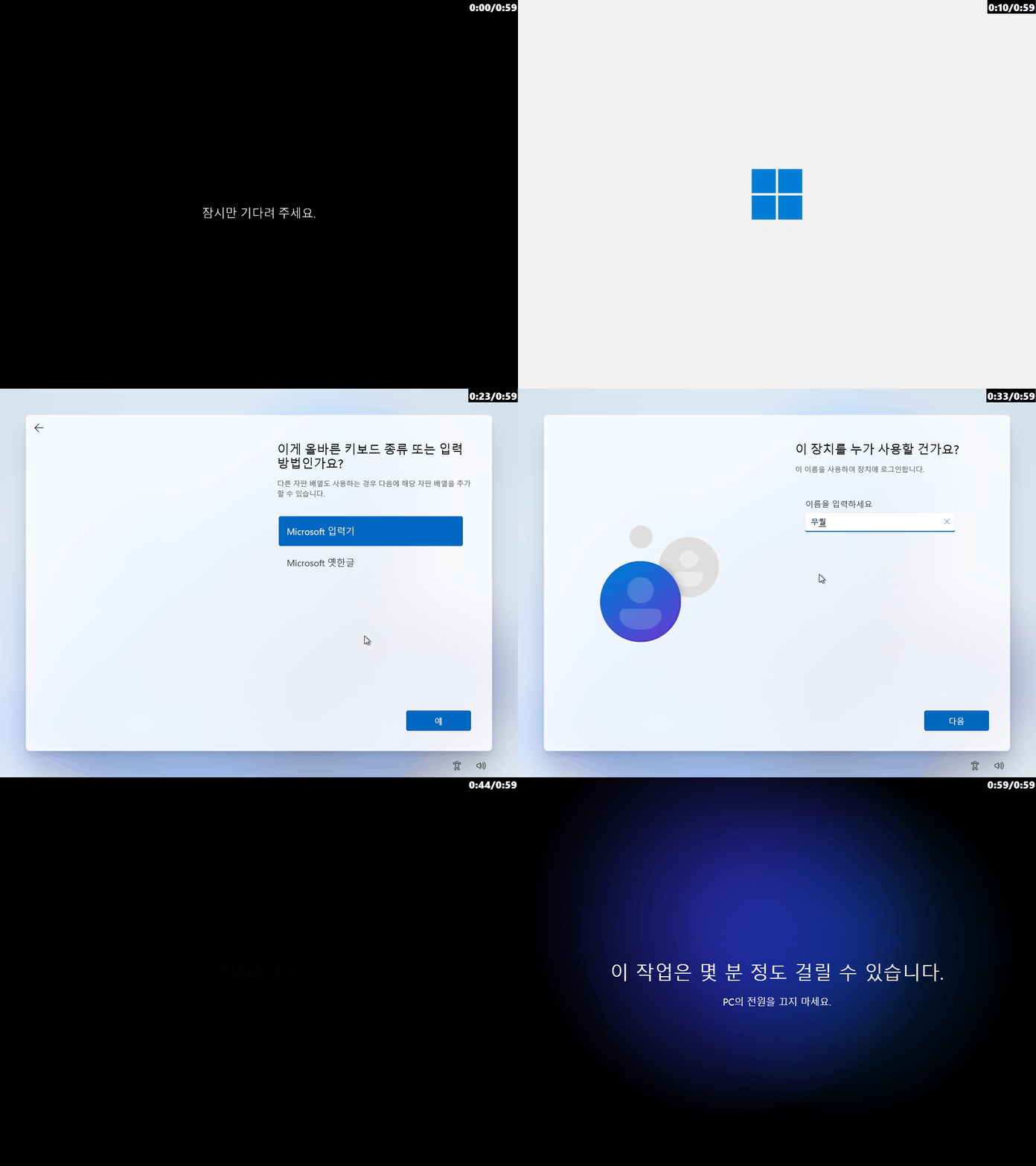
[ English / Multilingual - unattend.xml ]
<?xml version="1.0" encoding="utf-8"?>
<unattend xmlns="urn:schemas-microsoft-com:unattend">
    <servicing></servicing>
    <settings pass="windowsPE">
        <component name="Microsoft-Windows-Setup" processorArchitecture="amd64" publicKeyToken="31bf3856ad364e35" language="neutral" versionScope="nonSxS" xmlns:wcm="http://schemas.microsoft.com/WMIConfig/2002/State" xmlns:xsi="http://www.w3.org/2001/XMLSchema-instance">
            <RunSynchronous>
            </RunSynchronous>
            <!-- Specifies user configuration settings -->
            <UserData>
                <ProductKey>
                <!-- Leave blank to proceed without entering a product key -->
                    <Key></Key>
                </ProductKey>
                <!-- Specifies whether to automatically accept Microsoft Software License Terms (EULA) -->
                <AcceptEula>true</AcceptEula>
            </UserData>
            <!-- Specifies whether Windows Firewall can be used in Windows PE (preinstallation environment). This setting does not apply to Windows Firewall settings in the installed OS. -->
            <EnableFirewall>true</EnableFirewall>
            <!-- Specifies whether to enable network connections. This setting applies only to Windows PE. -->
            <EnableNetwork>false</EnableNetwork>
        </component>
    </settings>
    <settings pass="offlineServicing">
        <component name="Microsoft-Windows-WiFiNetworkManager" processorArchitecture="amd64" publicKeyToken="31bf3856ad364e35" language="neutral" versionScope="nonSxS" xmlns:wcm="http://schemas.microsoft.com/WMIConfig/2002/State" xmlns:xsi="http://www.w3.org/2001/XMLSchema-instance">
            <!-- If enabled, the Wi-Fi Sense checkbox for automatically connecting to open networks is selected during OOBE. -->
            <DefaultAutoConnectOpenState>0</DefaultAutoConnectOpenState>
            <!-- Unchecks the option to allow sharing of contacts and Wi-Fi network access during device OOBE. -->
            <DefaultAutoConnectSharedState>0</DefaultAutoConnectSharedState>
            <!-- Enables or disables Wi-Fi Sense features including hotspot auto-connect and credential sharing. -->
            <WiFiSenseAllowed>0</WiFiSenseAllowed>
        </component>
        <component name="Security-Malware-Windows-Defender" processorArchitecture="amd64" publicKeyToken="31bf3856ad364e35" language="neutral" versionScope="nonSxS" xmlns:wcm="http://schemas.microsoft.com/WMIConfig/2002/State" xmlns:xsi="http://www.w3.org/2001/XMLSchema-instance">
            <!-- Specifies whether Microsoft Defender can be remotely managed using recommended default settings. -->
            <EnableRemoteManagedDefaults>false</EnableRemoteManagedDefaults>
        </component>
        <component name="Microsoft-Windows-Embedded-KeyboardFilterService" processorArchitecture="amd64" publicKeyToken="31bf3856ad364e35" language="neutral" versionScope="NonSxS" xmlns:wcm="http://schemas.microsoft.com/WMIConfig/2002/State" xmlns:xsi="http://www.w3.org/2001/XMLSchema-instance">
            <!-- Browser forward key is not blocked (default behavior). -->
            <BrowserForward>Allowed</BrowserForward>
            <!-- Disables accessibility key combinations (e.g., Sticky Keys). -->
            <ForceOffAccessibility>true</ForceOffAccessibility>
        </component>
    </settings>
    <settings pass="generalize">
        <component name="Microsoft-Windows-WwanUI" processorArchitecture="amd64" publicKeyToken="31bf3856ad364e35" language="neutral" versionScope="nonSxS" xmlns:wcm="http://schemas.microsoft.com/WMIConfig/2002/State" xmlns:xsi="http://www.w3.org/2001/XMLSchema-instance">
            <!-- Hides mobile broadband devices and networks during OOBE. -->
            <NotInOOBE>true</NotInOOBE>
        </component>
        <component name="Microsoft-Windows-TapiSetup" processorArchitecture="wow64" publicKeyToken="31bf3856ad364e35" language="neutral" versionScope="nonSxS" xmlns:wcm="http://schemas.microsoft.com/WMIConfig/2002/State" xmlns:xsi="http://www.w3.org/2001/XMLSchema-instance">
            <!-- Specifies whether to rewrite configured telephony locations. -->
            <TapiConfigured>0</TapiConfigured>
        </component>
    </settings>
    <settings pass="specialize">
        <component name="Microsoft-Windows-Deployment" processorArchitecture="amd64" publicKeyToken="31bf3856ad364e35" language="neutral" versionScope="nonSxS" xmlns:wcm="http://schemas.microsoft.com/WMIConfig/2002/State" xmlns:xsi="http://www.w3.org/2001/XMLSchema-instance">
            <RunSynchronous>
                <!-- Install Windows 11 without Internet connection (OOBE\BYPASSNRO, applies to Windows 11 only) -->
                <RunSynchronousCommand wcm:action="add">
                    <Order>1</Order>
                    <Path>cmd /c for /f "tokens=3 delims=.]" %a in ('ver') do if %a geq 21996 (reg add "HKLM\SOFTWARE\Microsoft\Windows\CurrentVersion\OOBE" /v BypassNRO /t REG_DWORD /d 1 /f)</Path>
                </RunSynchronousCommand>
                <!-- Temporarily disable all network adapters to prevent updates during Windows OOBE -->
                <RunSynchronousCommand wcm:action="add">
                    <Order>2</Order>
                    <Path>powershell.exe -NoProfile -WindowStyle Hidden -ExecutionPolicy Bypass -Command "Get-NetAdapter | Disable-NetAdapter -Confirm:$false"</Path>
                </RunSynchronousCommand>
            </RunSynchronous>
        </component>
        <component name="Microsoft-Windows-Printing-Spooler-Core" processorArchitecture="amd64" publicKeyToken="31bf3856ad364e35" language="neutral" versionScope="nonSxS" xmlns:wcm="http://schemas.microsoft.com/WMIConfig/2002/State" xmlns:xsi="http://www.w3.org/2001/XMLSchema-instance">
            <!-- Prevents the spooler auto-log from starting at system boot. -->
            <Start>0</Start>
        </component>
        <component name="Microsoft-Windows-ErrorReportingCore" processorArchitecture="amd64" publicKeyToken="31bf3856ad364e35" language="neutral" versionScope="nonSxS" xmlns:wcm="http://schemas.microsoft.com/WMIConfig/2002/State" xmlns:xsi="http://www.w3.org/2001/XMLSchema-instance">
            <!-- Disables Windows Error Reporting. -->
            <DisableWER>1</DisableWER>
        </component>
        <component name="Microsoft-Windows-Security-SPP-UX" processorArchitecture="wow64" publicKeyToken="31bf3856ad364e35" language="neutral" versionScope="nonSxS" xmlns:wcm="http://schemas.microsoft.com/WMIConfig/2002/State" xmlns:xsi="http://www.w3.org/2001/XMLSchema-instance">
            <!-- Prevents Windows from attempting automatic activation. -->
            <SkipAutoActivation>true</SkipAutoActivation>
        </component>
        <component name="Microsoft-Windows-SQMApi" processorArchitecture="wow64" publicKeyToken="31bf3856ad364e35" language="neutral" versionScope="nonSxS" xmlns:wcm="http://schemas.microsoft.com/WMIConfig/2002/State" xmlns:xsi="http://www.w3.org/2001/XMLSchema-instance">
            <!-- Controls CEIP (Customer Experience Improvement Program) opt-in during OOBE. -->
            <CEIPEnabled>0</CEIPEnabled>
        </component>
        <component name="Microsoft-Windows-TCPIP" processorArchitecture="amd64" publicKeyToken="31bf3856ad364e35" language="neutral" versionScope="nonSxS" xmlns:wcm="http://schemas.microsoft.com/WMIConfig/2002/State" xmlns:xsi="http://www.w3.org/2001/XMLSchema-instance">
            <!-- Prevents route cache updates via ICMP redirect messages. -->
            <IcmpRedirectsEnabled>false</IcmpRedirectsEnabled>
        </component>
    </settings>
    <settings pass="oobeSystem">
        <component name="Microsoft-Windows-Shell-Setup" processorArchitecture="amd64" publicKeyToken="31bf3856ad364e35" language="neutral" versionScope="nonSxS" xmlns:wcm="http://schemas.microsoft.com/WMIConfig/2002/State" xmlns:xsi="http://www.w3.org/2001/XMLSchema-instance">
            <OOBE>
                <HideEULAPage>true</HideEULAPage>
                <HideLocalAccountScreen>true</HideLocalAccountScreen>
                <HideOEMRegistrationScreen>true</HideOEMRegistrationScreen>
                <HideOnlineAccountScreens>true</HideOnlineAccountScreens>
                <HideWirelessSetupInOOBE>true</HideWirelessSetupInOOBE>
                <ProtectYourPC>3</ProtectYourPC>
                <SkipUserOOBE>true</SkipUserOOBE>
                <UnattendEnableRetailDemo>false</UnattendEnableRetailDemo>
            </OOBE>
            <FirstLogonCommands>
                <!-- Enable network adapters after OOBE completion -->
                <SynchronousCommand wcm:action="add">
                    <Order>1</Order>
                    <CommandLine>powershell.exe -NoProfile -WindowStyle Hidden -ExecutionPolicy Bypass -Command "Get-NetAdapter | Enable-NetAdapter -Confirm:$false"</CommandLine>
                </SynchronousCommand>
            </FirstLogonCommands>
        </component>
        <component name="Microsoft-Windows-Sidebar" processorArchitecture="amd64" publicKeyToken="31bf3856ad364e35" language="neutral" versionScope="nonSxS" xmlns:wcm="http://schemas.microsoft.com/WMIConfig/2002/State" xmlns:xsi="http://www.w3.org/2001/XMLSchema-instance">
            <SidebarVisible>false</SidebarVisible>
            <SidebarOnByDefault>false</SidebarOnByDefault>
        </component>
    </settings>
</unattend>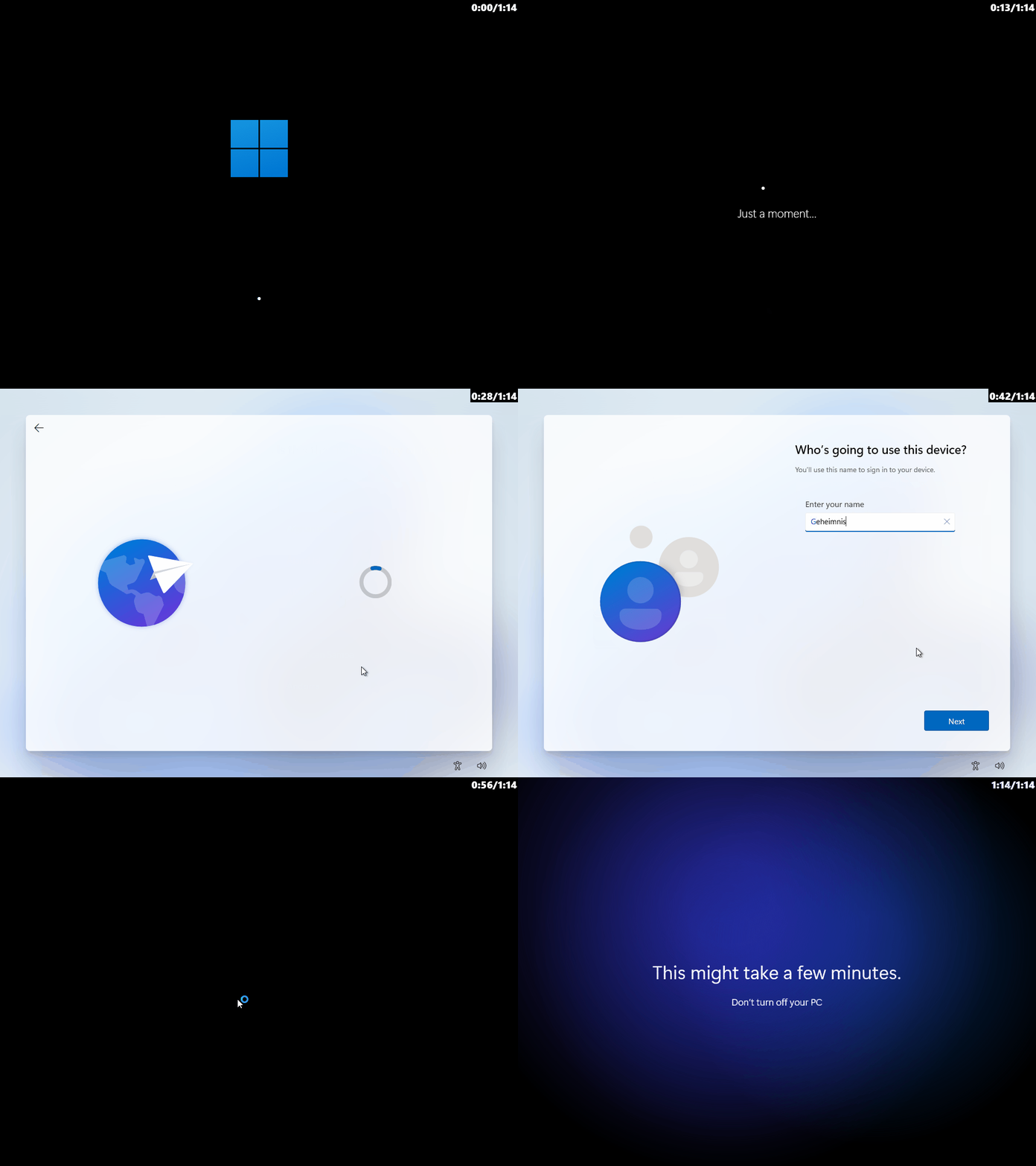
3. 체크박스 상태 기억 (User Preference)
사용자의 선택을 존중합니다. 한 번 설정한 '로컬 계정 설치' 여부를 INI 설정 파일에 저장합니다.
- 기능: 프로그램을 재시작하거나 OS 버전을 변경했다가 다시 돌아와도, 이전에 체크했던 상태를 그대로 복구합니다.
- 상세: 단, Win7/8.1을 선택하여 비활성화된 동안에는 잠시 해제되지만, 다시 Win10/11을 선택하면 원래의 체크 상태로 돌아옵니다.

4. 직관적인 다국어 문구 개선
사용자가 옵션의 기능을 한눈에 이해할 수 있도록 문구를 다듬었습니다.
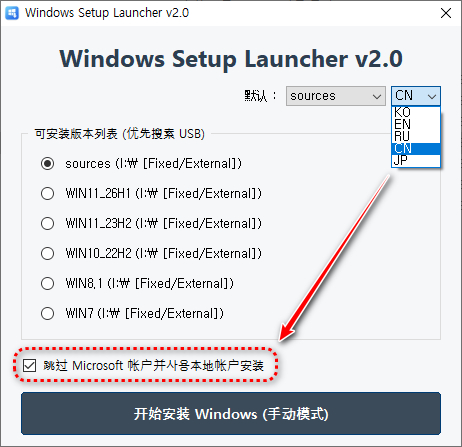
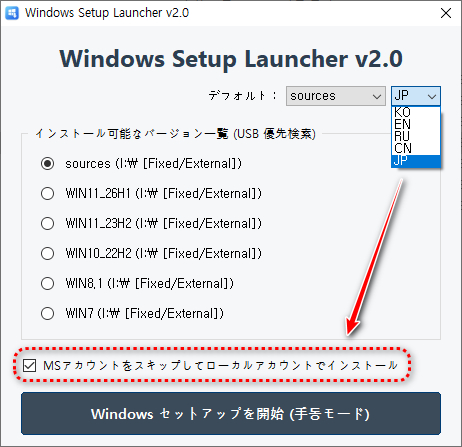
- 기존: "로컬계정으로 설치 /unattend 옵션 적용"
- 변경: "MS 계정 건너뛰기 및 로컬 계정으로 설치"
- 지원: 한국어(KO), 영어(EN), 러시아어(RU), 중국어(CN), 일본어(JP) 완벽 지원 (오타 수정 및 자연스러운 번역 적용)

Developer's Note: > 이번 v2.0은 WinPE 환경에서의 가독성과 조작 편의성에 집중했습니다. 특히 X: 드라이브나 고정 경로에 의존하지 않고 시스템 드라이브의 공용 Temp 폴더를 활용하여 어떤 환경에서도 FileInstall이 안정적으로 동작하도록 설계했습니다.

■ 동영상 제목 클릭 후 전체화면(1080P)시청 가능합니다.
정보가 도움이 되었다면 아래 링크로 커피를 후원 해주세요. ^^

'자작 프로그램 > 윈도우 설치 파일 선택기' 카테고리의 다른 글
| Windows Setup Launcher v4.0 - 무인설치 응답파일 선택 추가 (1) | 2026.04.22 |
|---|---|
| Windows Setup Launcher v3.0 - 오류 수정 (1) | 2026.04.18 |
| Windows Setup Launcher v1.0 (0) | 2026.04.08 |
| 윈런처(WinLauncher)KO/EN v4.0 - 기능 개선 중 . . . (0) | 2026.03.15 |
| 윈런처(WinLauncher)KO/EN v3.0 (0) | 2026.03.03 |